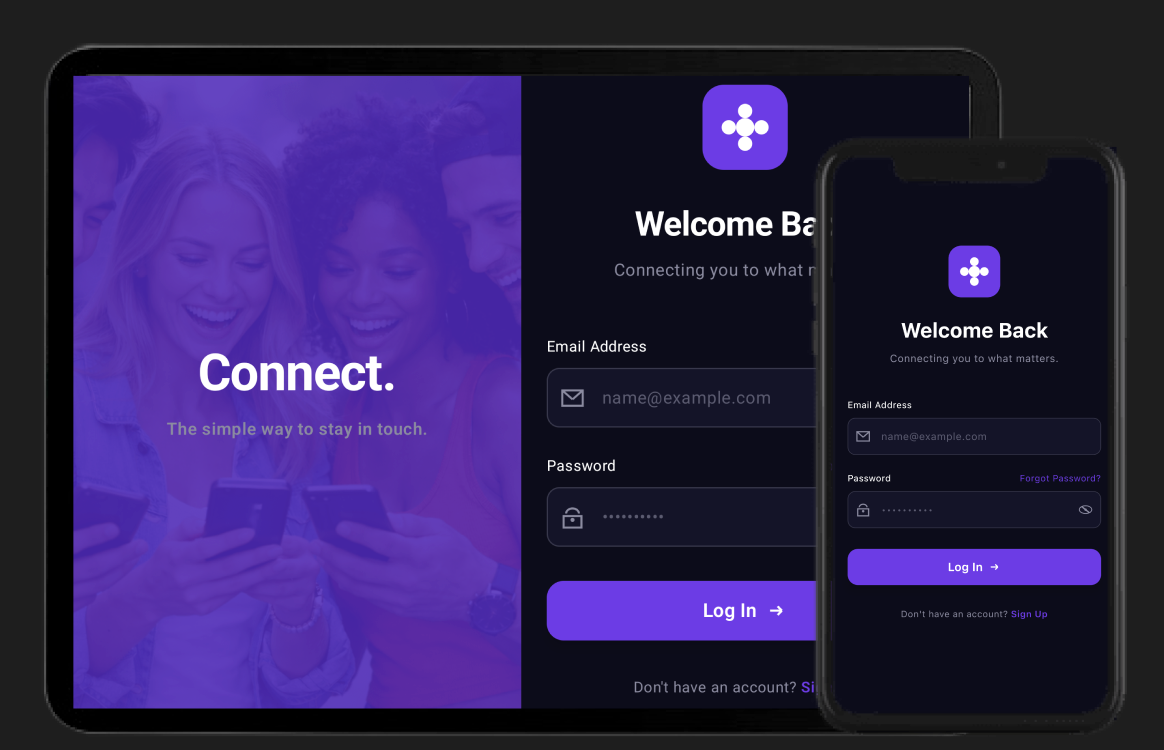
This project is the companion code for a Medium blog series on building adaptive layouts with Compose Multiplatform.
Read the full article: Building Adaptive Layouts in Compose Multiplatform
This repository demonstrates how to build adaptive user interfaces that seamlessly adapt from phones to tablets using Compose Multiplatform. The project implements a login flow that transforms based on window size:
- Compact & Medium widths — Single-pane login form optimized for phones
- Expanded widths — Two-pane layout with branding and side-by-side forms for tablets
-
/composeApp contains the shared Compose Multiplatform code.
- commonMain — Shared UI components, adaptive layouts, and business logic
- androidMain — Android-specific entry point
- iosMain — iOS-specific entry point
-
/iosApp — iOS application entry point with SwiftUI integration
| Component | Purpose |
|---|---|
AdaptiveWindowLayout |
Core composable that switches between layouts based on window width |
LoginScreen |
Adaptive login screen with single/dual-pane variants |
LoginPane |
Reusable login form with custom-drawn icons |
WelcomeScreen |
Branding screen with imagery and tagline |
- Compose Multiplatform — Shared UI across Android & iOS
- Material3 Adaptive — Window size classes and adaptive components
- Navigation 3 — Type-safe multiplatform navigation with Kotlin Serialization
- Kotlin Multiplatform — Shared business logic
./gradlew :composeApp:assembleDebugOpen the project in Android Studio or Xcode and run the iOS configuration, or:
open iosApp/iosApp.xcodeprojThis project accompanies a step-by-step Medium series covering:
- Setting up dependencies — Material3 Adaptive, Navigation 3, and Kotlin Serialization
- Understanding window size classes — Compact, Medium, and Expanded breakpoints
- Building AdaptiveWindowLayout — The foundation of adaptive UI
- Implementing adaptive navigation — Bottom nav, navigation rail, and drawers (coming next)
- List-detail with extra pane — Three-pane layouts for large screens (coming next)
Read the full article on Medium →
Learn more about Kotlin Multiplatform